
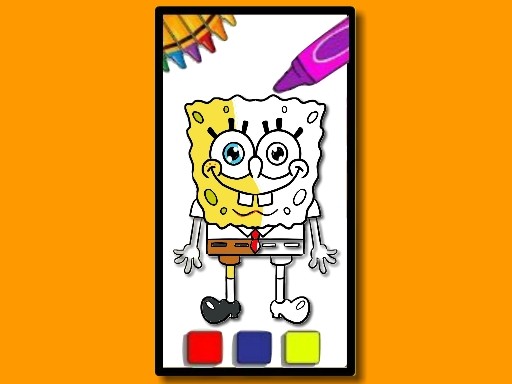
SpongeBob Coloring Fun
What players say
SpongeBob Coloring Fun does one thing without unnecessary complications: it lets children color familiar Bikini Bottom characters using a palette, adjustable brush sizes, and an undo button. The absence of timers, scores, and fail states keeps the mood relaxed, which suits its intended young audience. Saving and printing finished pages adds a small sense of ownership. The trade-off is limited depth; older players or anyone seeking goals will likely find it too simple. As a quiet creative break for kids, it stays within its scope.
About
Scene Selection and Coloring Tools
SpongeBob Coloring Fun opens with a menu of scenes featuring characters from the series, including SpongeBob, Patrick, Squidward, and Sandy. After choosing a picture, the player selects colors from a side palette and clicks or taps areas to fill them. A brush-size control lets players cover large regions quickly or switch to a smaller setting for tighter details. The undo button reverses the most recent action, which makes it easy to try a color and change course without restarting the page.
No Timers, No Pressure
The game has no time limit and no scoring system, so coloring pace is entirely up to the player. That design choice matters for younger children who may feel rushed by countdowns or lose interest when a level can be failed. Here, the only feedback loop is visual: fill an area, see the result, decide whether to keep it or undo. The interface is built for early readers and pre-readers, with simple navigation and touch support on tablets as well as mouse input on computers.
Saving and Printing Finished Artwork
When a scene is complete, the player can save the image to the device or print it. This turns each session into something shareable with family or friends rather than a disposable activity. Saving also lets children build a small portfolio of their own color choices over time, which can be more motivating than coloring a single page and closing the app. Because the game runs in a browser-friendly format on computers and tablets, the same artwork can be revisited later without special hardware.
Who This Suits
This is a casual creative tool aimed at young fans of the SpongeBob series and their families. It does not ask for reflexes, reading speed, or strategic thinking. The main skills involved are color selection, hand-eye coordination when tapping small areas, and patience with detail work. Parents looking for a quiet, safe activity with familiar cartoon characters will find the scope appropriately narrow: pick a scene, color it, save or print it.
Compatibility
FAQ
Comments
Sign in to comment
You must be logged in before posting a review or rating.
No comments yet. Be the first to comment!




Editorial Notes