
Bean Style Fashion Creator
What players say
Bean Style Fashion Creator does one thing clearly: it gives players a large wardrobe and lets them use all of it. The absence of ads, purchases, and time limits removes the usual friction from casual dress-up games, and the ability to save and share designs adds a light social layer. Its main limitation is the lack of structured goals, which may not appeal to players who want scoring or challenges. For kids, teens, and casual fashion fans, the focus on self-expression and color experimentation is the core appeal.
About
Avatar Building and Styling
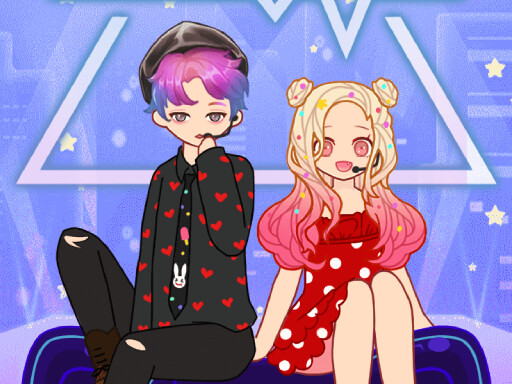
Bean Style Fashion Creator centers on assembling a virtual avatar from scratch. Players begin by choosing base features such as skin tone and face shape, then move through a wardrobe of clothing, hairstyles, makeup, and accessories. Each item can be tried on with a click or tap, and colors or patterns can be adjusted to personalize individual pieces. The process is deliberately open-ended, so no single combination is treated as correct.
Customization Without Constraints
The game includes hundreds of fashion items across its categories, and every piece is available without unlocking or spending. Because there are no in-app purchases, no ads, and no time limits, players can revisit the wardrobe as often as they like. That structure supports slow, deliberate styling rather than quick sessions driven by external pressure.
Saving and Sharing Designs
Completed looks can be saved for later or shared with friends and family. Saving lets players keep multiple outfits on hand and return to refine them, while sharing turns a private styling session into something others can respond to. The controls use simple drag-and-drop and tap interactions, which keeps the focus on creative decisions instead of interface complexity.
Who This Suits
Bean Style Fashion Creator is aimed at kids, teens, and casual players who enjoy fashion and self-expression. Its relaxed structure and lack of competitive elements make it approachable for anyone who wants to experiment with color, pattern, and silhouette without deadlines or scoring. Players who prefer goal-driven challenges may find the open format less engaging, but for creative dress-up play the scope is broad and unhurried.
Compatibility
FAQ
Comments
Sign in to comment
You must be logged in before posting a review or rating.
No comments yet. Be the first to comment!



Editorial Notes